Server-Side Tracking for Affiliate Lead Gen: Click ID Capture, Persistence, and S2S Postbacks
Affiliate lead gen attribution usually fails long before the postback fires. The weak point is rarely “the server.” It’s usually a simple handoff issue: a click lands on a prelander, moves to a lander on another domain, passes through a hosted form, gets pushed into a CRM, and somewhere along the way the original click ID disappears.
That’s why pixel-heavy setups can look fine in demos but underperform in real funnels. A browser event may fire, but if the affiliate click ID never makes it into the lead record, the later postback has nothing reliable to match against. Google’s own documentation reflects the same principle from a different angle: auto-tagging works because the click identifier is appended to the destination URL, and redirects must preserve it to the final landing page.[^1]
The practical thesis is simple: for affiliate lead gen teams without engineers, the best upgrade usually is not a complex server-side stack. It’s a minimal system that captures click IDs immediately, stores them in first-party storage, writes them into the lead record, and sends deduplicated server-to-server postbacks only from trusted lead events.[^1][^2]
Why attribution breaks before the postback
Cookie loss is only part of the issue. The deeper problem is identity loss across pages, domains, tools, and time. If traffic hits offersite.com, moves to quote-now.net, and submits through a hosted form, there are multiple chances to lose the one parameter that actually matters for payout attribution.
Affiliate trackers are consistent on this point: a postback only works if the original click ID is passed on the click and returned on conversion. Keitaro, for example, requires a click identifier such as subid plus a conversion status to process the postback.[^2] If that subid never reaches your form or CRM, no downstream automation can fix the mismatch.
So the real win is not more tracking. It’s better plumbing.
What this architecture actually does
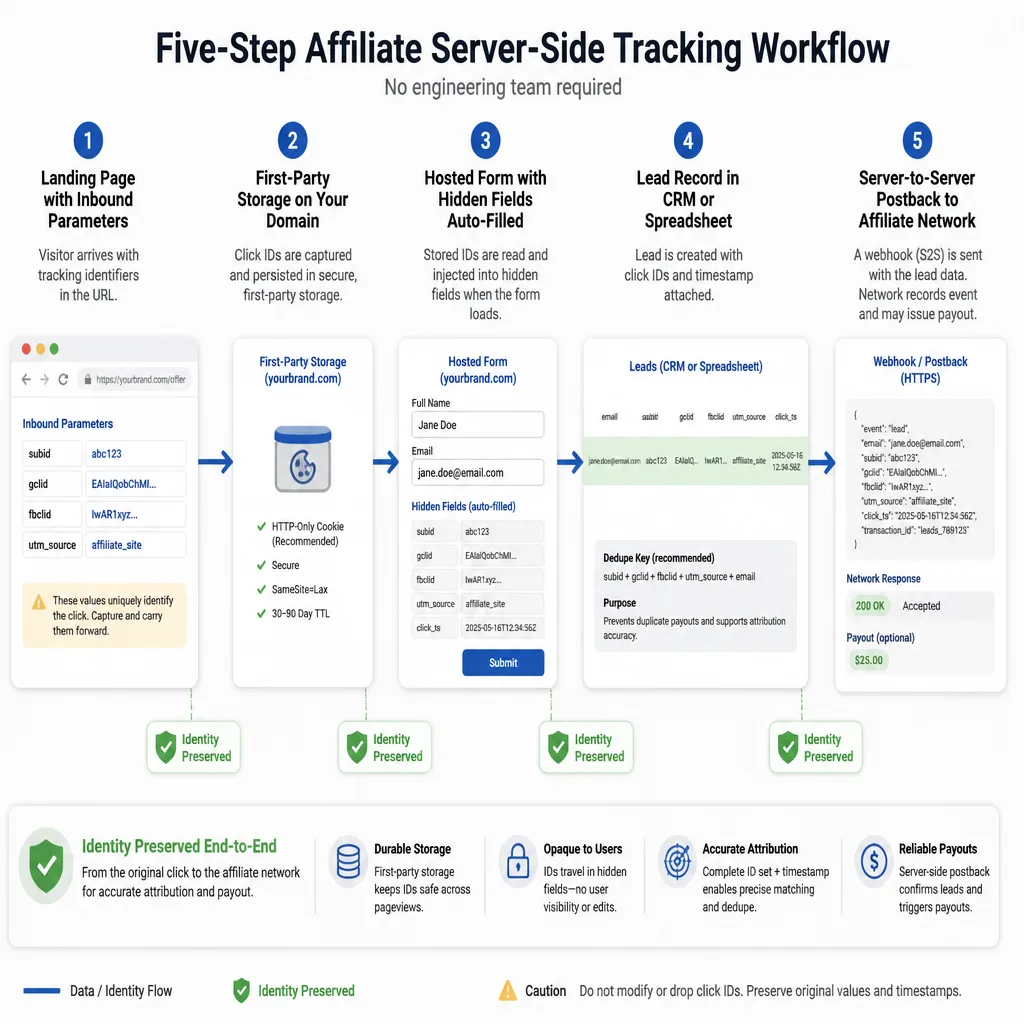
Step 1: Capture click identifiers at first touch
On the first landing page, capture every useful inbound ID from the URL. In most affiliate funnels, that means:
- affiliate network click ID or
subid gclidfbclid- UTMs
- referrer
- landing page URL
- first-touch timestamp
If you only do one thing, capture the affiliate click ID. That is usually the key needed later for payout attribution and postback matching.[^2]
Step 2: Persist them and pass them into the form
Once captured, store the values in first-party storage and pass them into hidden form fields before submission. Google Tag Manager’s Conversion Linker documentation explains the same idea clearly: click information found in landing page URLs can be stored in first-party cookies and browser storage on your domain.[^3]
For a no-dev team, the pattern is usually:
- Read URL parameters on page load.
- Save them in first-party cookies.
- Repopulate hidden fields on each funnel step.
- Write them into the lead record at submit time.
That last step matters more than most teams realize. Hidden fields are just a transport layer. The CRM record is the real destination.
Step 3: Send the S2S postback from a trusted system
Once the lead exists in a system you trust, send the postback from that system, not only from the browser. That could be a CRM automation, a webhook from a form tool, or a Zapier or Make scenario.
This is what makes the setup “server-side” in practical affiliate terms: the conversion is reported from a server-originated event, while the identity was captured and preserved earlier in the funnel.
Which identifiers matter most
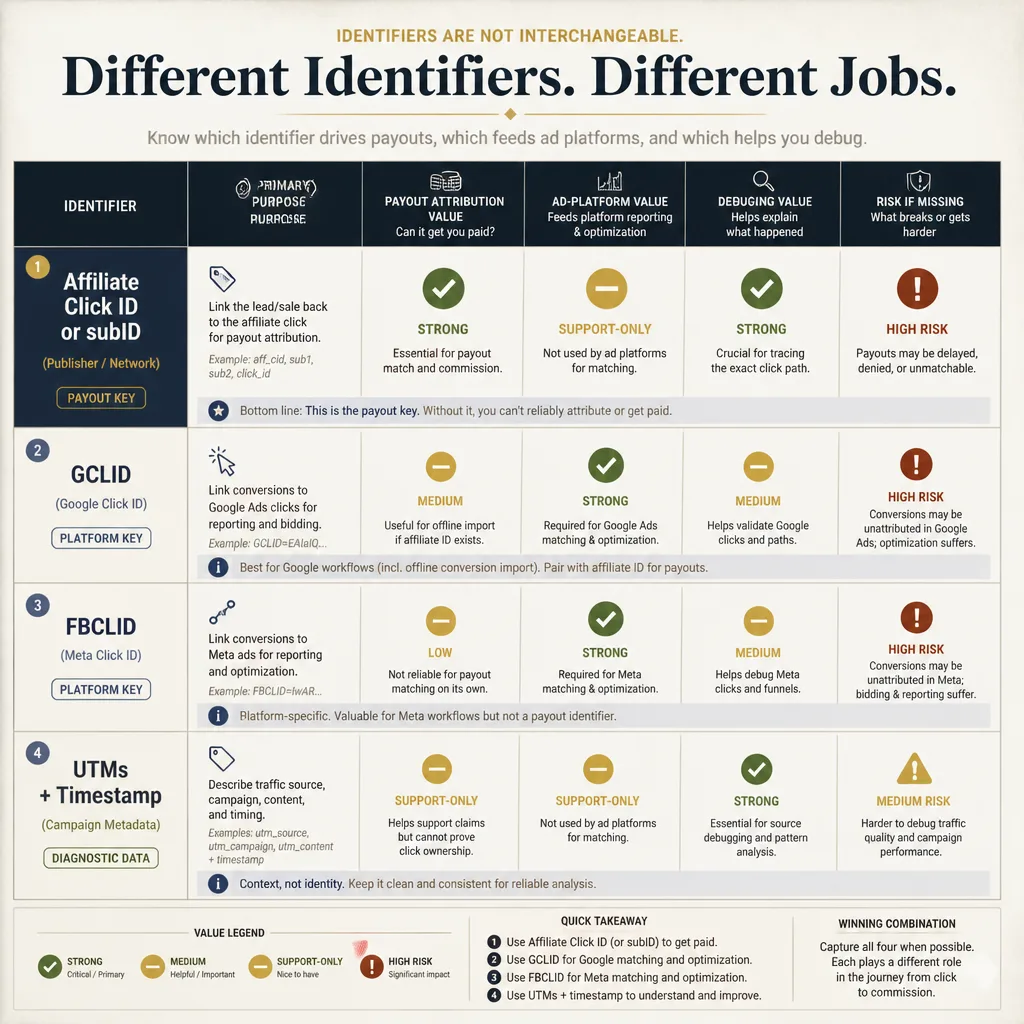
Affiliate click ID or subID
If payout depends on a network or tracker matching a click to a conversion, this is the primary key. Tracker documentation is clear that the postback depends on it.[^2]
A common mistake is focusing on ad-platform IDs while the affiliate click ID is missing from the form entirely. That is backwards.
GCLID
Google Ads auto-tagging appends gclid to the destination URL, and Google says it supports conversion reporting and offline or imported conversion workflows.[^1] If you buy Google traffic, keep it.
But gclid is not a replacement for the affiliate click ID. It solves a different problem: platform attribution and optimization, not affiliate payout matching.
FBCLID
fbclid is worth storing when present, but it is better treated as supporting context than as a core conversion key. Teams often expect too much from it.
UTMs and timestamps
UTMs, referrer, landing page URL, and first-touch timestamp will not rescue a broken postback by themselves. What they do provide is faster debugging.
When a lead appears in the CRM without a click ID, this metadata helps you see whether the problem happened at entry, during a redirect, or on the form step.
A practical path for teams without engineers
You do not need a custom backend to get most of the benefit.
Use link templates that preserve IDs
Start at the source. Ad links, tracker links, or affiliate redirects should append IDs in a predictable way. If a prelander sends traffic to a lander on another domain, pass the parameters forward explicitly.
For example:
prelander-a.com/?subid=123&gclid=abc- CTA forwards to
lander-b.com/?subid=123&gclid=abc
If you control both domains, this is straightforward. If you control only one, make parameter preservation a launch requirement.
Store values in first-party storage and hidden fields
First-party storage is more resilient than relying only on third-party pixels, but it is not permanent. WebKit states that script-writeable storage, including JavaScript-created cookies and localStorage, can be deleted after 7 days of no user interaction, with stricter limits in some link-decoration cases.[^4]
So the right mental model is not “storage solved.” It is “capture early and don’t wait too long.”
Save the lead record with the original IDs attached
For a small team, this can be as simple as:
- landing page or hosted form
- hidden fields populated from stored IDs
- lead sent to HubSpot, Airtable, Google Sheets, or a lightweight CRM
- one record per lead with click IDs attached
The key requirement is simple: the lead record must preserve the original affiliate click ID, not just UTMs.
Trigger postbacks with automations
Once the lead reaches a trusted system, trigger a webhook to the tracker or network. This is where low-code tools work well.
A realistic setup might look like this:
- traffic lands on Domain A prelander
- user clicks to Domain B form
- hidden fields carry
subid,gclid, and UTMs - form submits into HubSpot
- a HubSpot workflow or Make scenario sends the postback
- the tracker or network receives
subid,status, and payout if relevant
It is not flashy, but it is maintainable.
Where setups usually fail
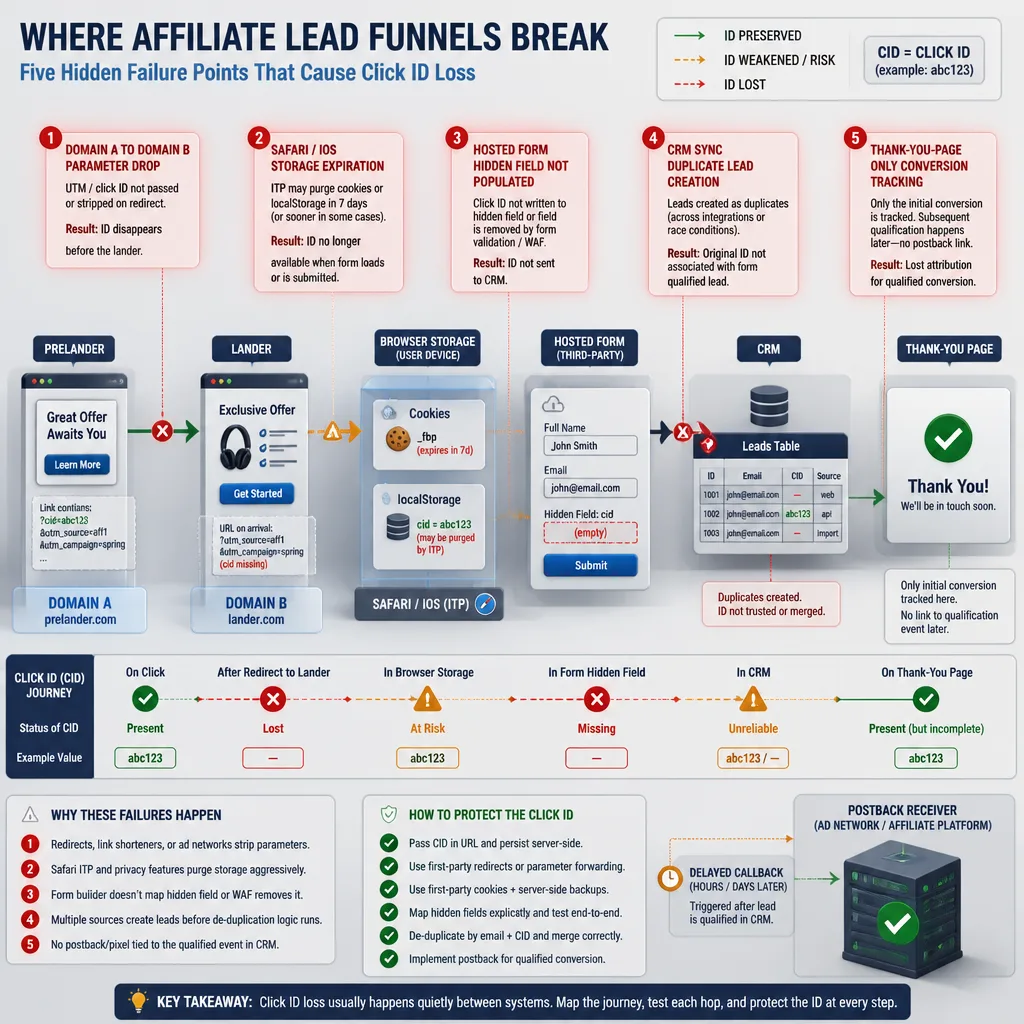
| Failure point | What it looks like | Typical fix |
|---|---|---|
| Cross-domain handoff | Leads in CRM have UTMs but no click ID | Pass parameters explicitly between domains |
| Safari or iOS persistence | Short-lag attribution looks fine, longer-lag drops | Capture on entry and reduce reliance on browser storage |
| Thank-you-page dependence | Form submits counted, qualified leads missing | Fire postbacks from CRM or lead system |
| Duplicate events | Reported conversions exceed real accepted leads | Define dedupe rules before launch |
| Late or retried callbacks | Same lead updates multiple times | Use event keys or transaction IDs |
Cross-domain flows that drop parameters
This is the most common silent failure. Google’s documentation on auto-tagging and conversion linker exists partly because redirects and domain handoffs do not preserve identifiers automatically.[^1][^3]
If your prelander and lander are on different domains, assume nothing. Test every handoff.
Safari and iOS persistence limits
Safari is not just “harder for tracking.” It has specific storage constraints. WebKit says script-writeable storage is capped after 7 days of no user interaction, with some decorated-link scenarios even more restricted.[^4]
If your funnel converts quickly, that may be fine. If conversions happen days later, expect lower match rates.
Thank-you-page tracking
A thank-you page is useful for QA, but it is a weak source of truth.
If a lead is qualified later by a call center, approved in a CRM, or retried through sync automation, the browser thank-you page cannot represent the full event lifecycle.
Duplicate lead fires
This is where many “tracking improvements” quietly inflate reported results. Keitaro documents that repeated postbacks with the same status can overwrite previous conversions, and separate entries require a unique tid or transaction ID.[^2]
So define the rule before launch:
- one conversion per click ID per event type, or
- multiple events only when each has a unique transaction or status key
A simple reliability model
The best lightweight framework is:
Capture → Persist → Attach → Postback → Dedupe → Validate
Why first-touch capture matters most
If you miss the ID on entry, every later step becomes damage control. That is why early capture is usually more valuable than adding more scripts.
Why lead status should drive event logic
Some funnels should send one postback on submit. Others should send separate events for lead and qualified. Both approaches can work.
The mistake is sending both without clear logic and then wondering why the numbers drift.
How to handle deduplication simply
You do not need complex backend logic. You need one stable dedupe rule.
For simple funnels, a good minimum is:
click_id + event_type
If one click can generate multiple legitimate events of the same type, add a transaction ID or CRM lead ID. Keitaro explicitly supports tid for repeated conversions that should be recorded separately.[^2]
How to validate improvement without fooling yourself
This is where teams often get careless.
Separate reporting lift from business lift
If tracked conversions increase by 22% after implementation, that does not automatically mean the business generated 22% more value. It may simply mean you now capture conversions that were previously unattributed.
That is still useful. It is just a different claim.
Start with match-rate diagnostics
Ask questions like:
- What percentage of leads in the CRM have a valid affiliate click ID?
- What percentage of accepted leads can be matched back to source?
- What percentage of postbacks succeed without retry or error?
These are reliability metrics. They tell you more than a dashboard spike.
Compare attribution consistency, not just totals
If source-level performance changes sharply after implementation, check whether that reflects real quality differences or just cleaner matching. Sometimes the strongest signal is not more conversions, but more stable source-to-qualified-lead ratios.
Use staged rollouts when possible
If you can, roll the setup out one source at a time. Or compare one funnel using the new setup against a similar funnel still using the old logic.
You are not trying to prove perfect causality. You are trying to avoid misleading yourself.
When this setup is enough
Best fit
This architecture works well when you have:
- one main lead event
- limited dev resources
- one or two domains
- a manageable CRM handoff
- a clear payout event
In that environment, simple reliability beats sophistication.
Weak fit
It becomes less effective when attribution depends on phone calls, delayed underwriting, complex consent requirements, or multiple downstream systems.
It still helps, but it stops being enough on its own.
When you need something bigger
Once you need user stitching across many systems, deep offline reconciliation, or multi-touch attribution, you are no longer solving a postback plumbing problem. You are solving a data architecture problem.
That is a different project.
Conclusion
The real advantage of server-side tracking for affiliate lead gen is not that it sounds more advanced. It is that it can be more reliable in day-to-day operations.
For most teams without engineers, the highest-leverage move is simple: preserve click identity through the funnel. Capture IDs on entry, store them first-party, attach them to the lead record, and send deduplicated postbacks only from trusted events. That will usually outperform a more elaborate setup that still drops the click ID between the prelander and the CRM.
If there is one takeaway, it is this: the simplest system that keeps identity intact across the lead lifecycle is usually better than the fanciest one that breaks during handoff.
FAQ
How do you set up affiliate S2S tracking without developers?
Use a low-code flow: capture inbound click IDs from the URL, store them in first-party cookies or similar storage, pass them into hidden form fields, save them in your CRM or lead sheet, and trigger a server-to-server postback from a trusted system such as a webhook or CRM automation.
What click IDs should be stored for affiliate lead gen?
Store the affiliate network click ID or subID first, because that usually drives payout attribution. Also keep gclid when present for Google Ads workflows, fbclid as supporting context, plus UTMs, referrer, landing page URL, and a first-touch timestamp for debugging and validation.
Why does attribution break across domains?
Usually because parameters are not preserved when a visitor moves from a prelander to a lander on another domain, or because the form or CRM never receives the original click ID. Once that identity is lost upstream, a later postback cannot recover it.
Is server-side tracking the same as cookieless attribution?
No. Server-side tracking can reduce reliance on fragile browser-side pixels, but it is not magic. You still need to capture identifiers early, store them reliably, and attach them to the lead record before any server-to-server postback can work.
How long should click IDs persist?
Long enough to cover your normal conversion lag, with realistic expectations. Many teams aim for a window that matches funnel behavior, then accept that Safari and iOS rules can shorten script-writeable storage persistence. That is why early capture and fast lead handling matter.
Should you store only GCLID or FBCLID?
No. gclid and fbclid are not substitutes for the affiliate network click ID. The network click ID is usually the main key for postback matching, while gclid supports Google Ads attribution workflows and fbclid may provide extra context.
How do you dedupe affiliate postbacks?
Use a stable idempotency rule before launch. For simple funnels, a practical baseline is one conversion per click ID per event type. If the same click can legitimately create multiple events, add a transaction ID, CRM lead ID, or status-based event key so retries and sync errors do not inflate reported conversions.
When should a lead funnel send one postback versus multiple postbacks?
Send one postback if the only event that matters is the initial lead. Send multiple postbacks only when your network or reporting setup needs separate stages such as lead submitted and qualified lead accepted. If you do that, define unique statuses or transaction IDs so later updates do not overwrite or duplicate earlier ones.
Why is thank-you-page tracking often not enough for affiliate lead gen?
A thank-you page can confirm that a form fired, but it often misses delayed qualification, offline acceptance, CRM retries, or browser-side loss. For lead gen, trusted postbacks from the CRM or lead-processing system are usually more reliable than depending only on the browser reaching a final page.
How do you validate whether server-side tracking actually improved performance?
Start by separating reporting lift from business lift. Check click-to-lead match rates, postback success rates, and consistency between source data and qualified leads. If possible, compare before-and-after periods carefully, roll out source by source, or run a simple holdout so you do not confuse cleaner counting with true incremental improvement.
When is this minimalist setup enough?
It is a strong fit for simple affiliate lead funnels with one main conversion point, limited technical resources, and a need for better attribution reliability. It becomes less suitable when you need multi-touch attribution, complex offline journeys, heavy call-center flows, or event streaming across many systems.
[^1]: Google Ads Help documents that auto-tagging appends the GCLID to destination URLs and supports reporting plus offline/imported conversion workflows, and that redirects need to preserve the identifier.
[^2]: Keitaro documentation explains that postbacks depend on a click ID such as subid and a status, and that repeated conversions may require a unique tid to avoid overwriting or miscounting.
[^3]: Google Tag Manager’s Conversion Linker documentation explains that ad click information from landing page URLs can be stored in first-party cookies and browser storage, and that form decoration can be enabled when needed.
[^4]: WebKit’s tracking prevention documentation states that JavaScript-created cookies and other script-writeable storage can be deleted after 7 days of no user interaction, with stricter limits in some link-decoration scenarios.